

How Web Design Affects SEO Rankings: A Complete Tutorial
Your website's design is more than just aesthetics; it's a critical component of your SEO success. In this guide, we'll break down exactly how design choices influence your search engine rankings and provide actionable steps you can take to optimise your site.

Why Web Design and SEO Are Inseparable
Many business owners, including many right here in Sheffield, make the mistake of treating SEO and web design as separate projects. They focus on keywords and backlinks after the site is built. However, search engines like Google use sophisticated algorithms that heavily prioritise user experience (UX), and your website's design is the primary driver of that experience.
A poorly designed site will struggle to rank, no matter how many keywords you include. Conversely, a well-designed site creates a foundation that makes all other SEO efforts more effective.
Core Web Design Factors That Directly Impact SEO
Let's dive into the specific design elements that search engines evaluate when determining your ranking.
1. Page Loading Speed
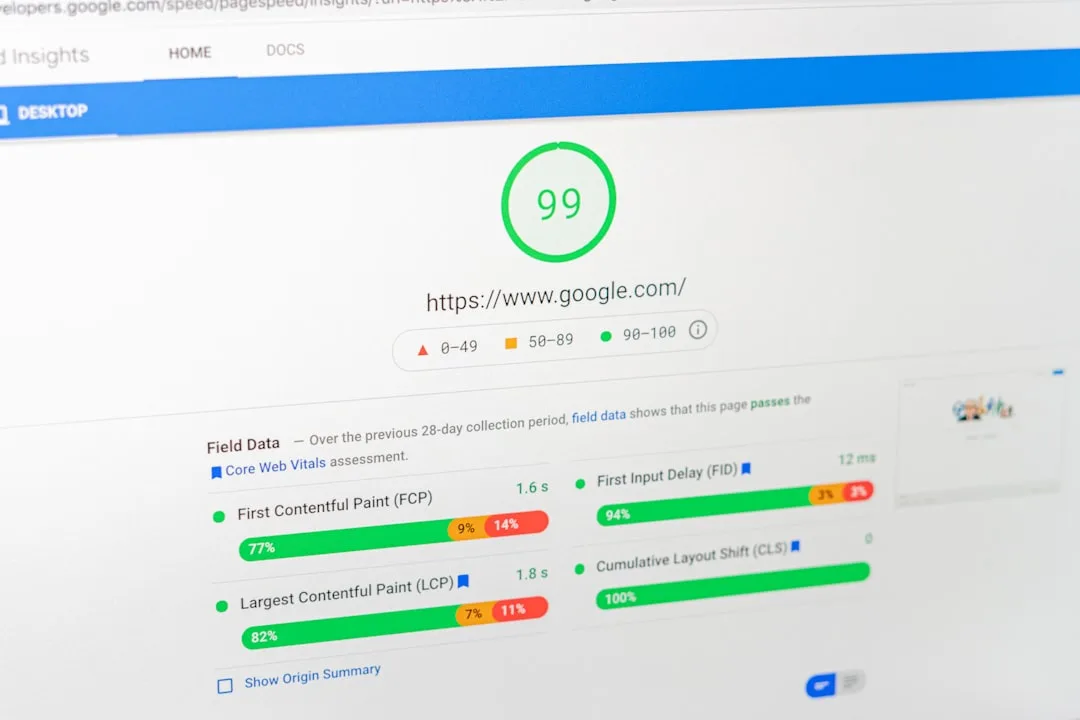
Speed is a confirmed ranking factor. If your site takes too long to load, users will leave (increasing your bounce rate), and Google will take notice. For businesses in South Yorkshire where internet speeds can vary, ensuring your site loads quickly for all users is crucial.
Design elements that affect speed include:
- Image Size and Optimisation: Large, unoptimised images are a primary culprit for slow loading times.
- Code Cleanliness: Bloated, messy code (especially from drag-and-drop builders if not used carefully) can slow down your site.
- Hosting Quality: The server your site is hosted on plays a significant role. Choosing a reliable host is a design-related decision.
2. Mobile-Friendliness and Responsive Design
Google now uses mobile-first indexing, meaning it primarily uses the mobile version of your site for indexing and ranking. If your site isn't optimised for mobile devices, it will not rank well. A responsive design automatically adjusts its layout to fit any screen size, from desktops to smartphones.
This is non-negotiable. A potential customer searching for "web design Sheffield" on their phone must have a seamless experience on your site.
3. Website Architecture and Navigation
How you structure your website helps search engines understand and crawl your content efficiently. A logical, intuitive hierarchy is key.
A SEO-friendly site structure includes:
- Clear, Simple Menus: Users and search bots should be able to find any page within a few clicks.
- Logical URL Structure: URLs like `yoursite.com/services/web-design-sheffield` are clear and keyword-rich.
- Internal Linking: Strategically linking to other relevant pages on your site helps distribute "link equity" and keeps users engaged.
4. Content Readability and Layout
Great content can be undermined by poor design. If text is difficult to read because of font choice, size, colour contrast, or cluttered layouts, users will not stay on the page.
Design for readability by using:
- High-contrast text (e.g., dark grey on white, not light grey on white).
- Short paragraphs and ample line spacing.
- Clear headings and subheadings (H1, H2, H3 tags) to break up text.
- Bullet points and numbered lists (like this one) to improve scannability.
Actionable Web Design for SEO Checklist
Ready to audit your own site? Follow this step-by-step checklist to identify and fix design issues harming your SEO.
-
Test Your Page Speed:
Use Google's free PageSpeed Insights tool. Enter your URL and address any critical issues it highlights, such as optimising images or eliminating render-blocking resources.
-
Audit for Mobile-Friendliness:
Use Google's Mobile-Friendly Test. Resize your browser window to see how your site looks on different screen sizes. Ensure buttons are easy to tap and text is readable without zooming.
-
Simplify Your Navigation:
Ask a friend to find a specific piece of information on your site. If they struggle, your navigation needs work. Aim for a flat architecture where no page is more than 3-4 clicks from the homepage.
-
Improve Content Layout:
Scan your key pages. Are they wall-of-text or easy to scan? Add subheadings, images, and lists to improve readability and keep users engaged longer.

Local SEO and Web Design: A Guide for Sheffield Businesses
For businesses serving Sheffield and the wider South Yorkshire region, local SEO is vital. Your web design must support your local SEO strategy.
- Prominent Contact Information: Your address, phone number, and a link to Google Maps should be easy to find, typically in the header or footer.
- Localised Content: Design your pages to naturally include local landmarks, customer testimonials from the area, and service pages tailored for local search queries (e.g., "SEO Agency Sheffield").
- Schema Markup: While technical, adding local business schema markup in your site's code helps search engines display your key local information directly in search results.
Common Web Design Mistakes That Kill SEO
Avoid these pitfalls to protect your rankings:
- Using Text Within Images: Search engines can't read text inside image files. Always use live, HTML text for important content and headings.
- Flash or Heavy JavaScript: These can hinder crawling and indexing. Use modern, lightweight alternatives.
- Poor 404 Pages: A dead end frustrates users. Design a helpful 404 page that includes a search bar and links to popular sections of your site.

FAQs: Web Design and SEO
Can a beautiful website still be bad for SEO?
Absolutely. A visually stunning site can be built with code that search engines struggle to crawl, or it might be slow to load and difficult to use on a mobile device. Form and function must work together.
I'm using a website builder like Wix or Squarespace. Is that okay for SEO?
Modern website builders have significantly improved their SEO capabilities. While they can be a good starting point for small businesses, they can sometimes create limitations for advanced SEO strategies. The key is to understand and maximise the SEO settings available within your chosen platform.
How often should I update my website's design for SEO?
You don't need a complete redesign every year. However, you should continuously audit and tweak your site based on performance data (like Google Analytics and Search Console) and evolving best practices. A major redesign every 3-5 years is common to stay modern and competitive.
Conclusion: Design with Purpose
Effective web design is not about following the latest trend; it's about creating a purposeful, user-centric experience that satisfies both your visitors and search engine algorithms. By prioritising speed, mobile responsiveness, clear architecture, and readability, you build a strong foundation for sustainable SEO success.
Whether you're a startup in Sheffield city centre or an established firm in South Yorkshire, investing in SEO-friendly design is one of the smartest decisions you can make for your online visibility and growth.

0 Comments
Leave a Comment